 Colour Cozy
Happy Color hints: how they work, and how to find that last cell
A picture stuck just short of finished is the most common color by number frustration. Here is how hints help, and how to find the missing spot without one.

In this guide
Happy Color hints sit behind a light bulb button on the coloring screen: tap it and the game points you to a spot you have not colored yet. When your free hints run out, the bulb offers a short ad for another one. To find the last cell without a hint, zoom out, check every number in the color bar, look along outlines and in tiny gaps, and reopen the picture so empty cells stand out.
You have colored every flower, every cloud and every stripe. The progress bar is almost full, but the picture will not finish. Somewhere there is one tiny cell left, and you cannot see it.
This happens in every color by number game, because the pictures are made of many small shapes and some of them hide inside lines. Hints were invented for exactly this moment. This guide explains how hints work in Happy Color, what to do when the bulb only offers an ad, and how to find the missing spot on your own. We make a different coloring game, Colour Cozy, so we stick to what Happy Color's own store page and help pages say and to tips that work in any number app.
How hints work in Happy Color
Happy Color is a color by number app by X-Flow. While you color, a light bulb button sits near the top of the screen. Tap it and the game highlights an area you have missed, usually by zooming toward it. That is the whole idea: a hint does not color anything for you, it just shows you where to look.
You start with some hints, and the bulb shows how many you have left. When the count reaches zero, the bulb changes and offers a short video ad instead. Watch it to the end and you get a hint. Button names and icons can change between app versions, so trust what is on your own screen.
One detail surprises people. Happy Color's App Store listing lists a purchase to remove ads with the note that hint ads stay. So even without ads, extra hints can still come from a video you choose to watch.
Why Happy Color is not giving hints
If you tap the bulb and nothing happens, or it says no ad is available, try these in order:
- Check your connection. Hint videos need Wi-Fi or mobile data. With no connection there is no video, so no hint.
- Wait a minute and try again. Sometimes there is simply no ad ready at that moment.
- Close the app fully and reopen it. This clears a stuck screen without touching your pictures.
- Update the app. Fixes for buttons that stop working usually arrive as updates.
- Free up some storage and restart the device. A very full phone can make any app behave oddly.
If the whole app freezes or closes rather than just the bulb, our guide to fixes for when Happy Color keeps crashing lists safe steps that will not cost you your progress.
Six ways to find the last cell without a hint
You do not always need a hint. These tricks work in Happy Color and in most other number apps.
- Zoom all the way out. Look at the whole picture at once. A lone white or gray patch is easier to spot from far away than up close.
- Check the color bar. Finished colors usually get a tick or disappear. Scroll through the bar and tap any number that is still there; most apps then shade the cells of that number so you can see them.
- Follow the outlines. The last cell is very often a thin sliver tucked against a black line, between two petals or at the corner of an eye. Zoom in and trace the edges slowly.
- Look in the tiny places. Sparkles, dots, freckles, buttons and the gaps between letters are classic hiding spots.
- Close and reopen the picture. Players often find that reopening a picture with no color selected makes the uncolored cells stand out bright white.
- Turn the brightness up. A pale cell next to a pale color can almost vanish on a dim screen.
Happy Color hints compared with other ways to finish
| Way to finish a picture | What it does | What it costs | Works when |
|---|---|---|---|
| Happy Color hint bulb | Points to an area you missed | A free hint, or an optional video when you run out | You have hints or an ad is ready |
| Checking the color bar | Shows which numbers still have cells | Nothing | Any time |
| Zoom and trace the outlines | You find the spot yourself | A bit of patience | Any time |
| Reopening the picture | Makes empty cells easier to see | Nothing | Any time |
| Colour Cozy Find button | Zooms to an unfilled spot and flashes it | Nothing (coming soon on Google Play) | Once the app is out |
How finding a missed spot works in Colour Cozy
We make Colour Cozy, a calm coloring game for Android that is coming soon to Google Play. It is not out yet, so it cannot help with a Happy Color picture today. But a stuck last cell was something we thought about a lot, so here is how our game handles it, checked against the game's code.
At the top of the coloring screen there is a magnifier button called Find a spot. It is free and has no limit. In color by number mode it looks for the smallest spot left in the color you are using, switches to the right color if that one is already done, zooms in and makes the spot flash. Small spots first is on purpose: they are the ones that hide.
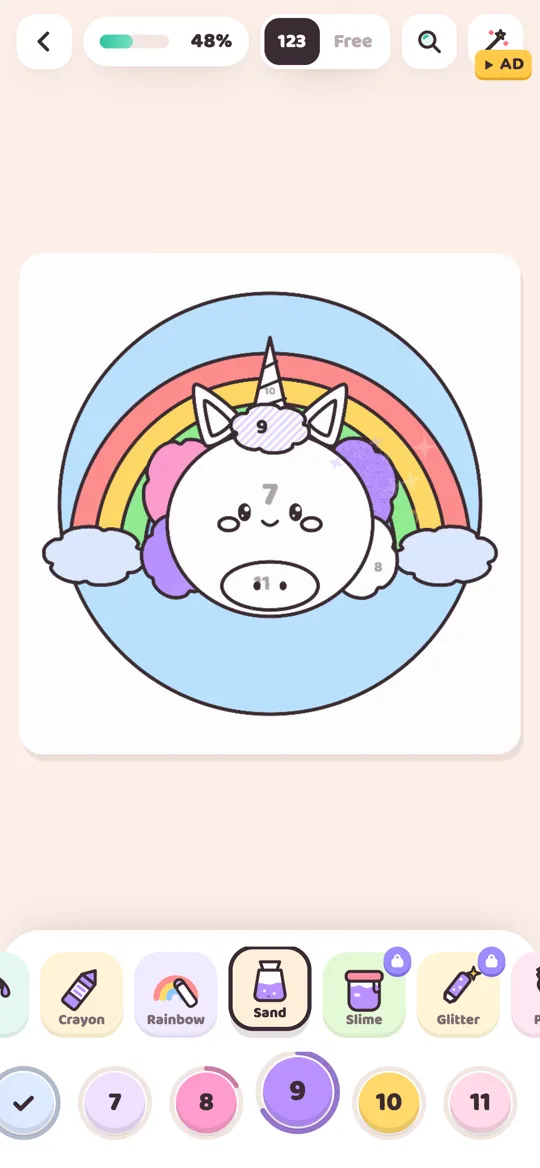
A few other things help along the way:
- Gentle wrong-color hints. Tap a spot with the wrong color and a little bubble shows which number it needs, and that color nudges in the bar.
- Auto next color. When you finish a color, the game moves you to the next number that still has spots.
- Pinch zoom. Two fingers bring tiny details close.
- Magic fill, if you want it. The wand button colors everything that is left after an optional video. You never need it to finish a picture.
You trace the picture first, then color by number or freely with 12 tools, including sand, slime and glitter, and there are no timers. If you prefer to color freely, the numbers do not matter at all; our color by number vs free coloring guide explains both ways.
Happy Color tips and tricks for fewer stuck pictures
A few habits stop the 99 percent problem before it starts:
- Finish one color completely before the next. Zoom out and check before you move on.
- Color the small cells first. Big areas are easy to remember; tiny ones are not.
- Use two fingers to zoom in on busy parts like hair, lace and patterns, then zoom out again.
- Save hints for detailed pictures. Simple pictures rarely need them.
If you are tired of hunting cells altogether, you might enjoy a game with a free coloring mode. Our list of apps like Happy Color sorts the options by how you color.
FAQ
How do I get hints in Happy Color?
Tap the light bulb button on the coloring screen. It shows how many hints you have. When you run out, the bulb offers a short optional video, and you receive a hint after watching it.
Why is Happy Color not giving me hints?
Usually no video is available or the connection is down. Check your Wi-Fi or data, wait a minute, close and reopen the app, and update it if an update is waiting.
Can I get unlimited hints in Happy Color?
We could not find an official unlimited hint option. The App Store listing says hint ads stay even when you buy the remove-ads option. Be careful with sites that promise hacks; they are not from the developer and can be unsafe.
How do I find the last cell in a color by number picture?
Zoom all the way out, check which numbers are still in the color bar, tap them to shade their cells, and trace outlines and tiny details. Reopening the picture can also make empty cells stand out.
Does Colour Cozy have hints?
Yes. A free Find a spot button zooms to a spot you missed and makes it flash, and tapping the wrong color shows which number a spot needs. Colour Cozy is coming soon to Google Play.